前言 ML-Agents是Unity官方的一个强化学习框架,使用gRPC进行Python和Unity间的通信,让开发者得以仅在Unity中写C#,配置yaml训练参数就可训练所想要的模型 。个人在学习过程中找到的资料多为不兼容的旧版,故感觉还是有些必要记录下相关。
准备 资源准备 参照官方文档 ,Unity端的话ML-Agents在Unity的Package Manager中可以直接安装。Python环境的话建议用Conda,毕竟Python3.10.1-3.10.12这版本要求还真不常见。之后克隆下官方Github代码库 ,键入
1
2
3
4
pip install mlagents cd /path/to/ml-agents pip install ./ml-agents-envs pip install ./ml-agents
安装必要库即可。需要指正下cuda版本的torch不是刚需,这又不是练大模型,用Burst跑甚至兼容性更强。
大致用法 Unity代码中控制智能体的框架大抵如下。Heuristic()并非刚需,一般用于测试环境或是录制专家数据,所以也算较为重要,建议带上。调用神经网络推理的话可以在传统Update()中每次RequestAction()来Tick一步,也可以在代理游戏物体上再附加DecisionRequester脚本,自定义每几帧Tick一次。以及附加上继承代理架构的脚本后会先自动加上BehaviourParameters,此时需要在SpaceSize和ContinousActions配置正确的输入输出维度(多少个float)。
1
2
3
4
5
6
7
8
9
using Unity.MLAgents; public class PlayerAgent : Agent { public override void OnEpisodeBegin () public override void CollectObservations (Unity.MLAgents.Sensors.VectorSensor sensor ) public override void Heuristic (in Unity.MLAgents.Actuators.ActionBuffers actionsOut public override void OnActionReceived (Unity.MLAgents.Actuators.ActionBuffers actionBuffers ) }
而yaml的话可以先复制下官方的,需要一些机器学习的基础知识修改。值得一提的是vis_encode_type有simple,nature_cnn,resnet,match3(三消特化),fully_connected可选,其中simple有20x20卷积核,nature_cnn有36x36卷积核, resnet有15 x 15卷积核, match3:有5x5卷积核,输入尺寸不得小于卷积核。
1
2
3
4
5
6
7
8
9
10
11
12
13
14
15
16
17
18
19
20
21
22
23
24
25
behaviors: default: trainer_type: ppo hyperparameters: batch_size: 64 buffer_size: 12000 learning_rate: 0.005 beta: 0.001 epsilon: 0.2 lambd: 0.99 num_epoch: 3 learning_rate_schedule: linear network_settings: normalize: true hidden_units: 128 num_layers: 2 vis_encode_type: simple reward_signals: extrinsic: gamma: 0.99 strength: 1.0 keep_checkpoints: 5 max_steps: 500000 time_horizon: 1000 summary_freq: 12000
进阶 近期刚好刷到吃豆人幽灵行动模式的介绍,再一次被FC红白机中游戏的巧思震惊,就想着复刻一下练上一练。
幽灵姓名
颜色
行为模式
核心策略与目标
Blinky
红色
追击者
始终瞄准吃豆人当前所在位置进行直线追击。
Pinky
粉色
拦截者
目标是吃豆人前方4格的位置进行包抄和伏击。
Inky
蓝色
投机者
目标为Blinky与吃豆人前方2格的镜像点。通常从侧翼或后方发起突袭。
Clyde
橙色
飘忽者
与吃豆人的距离大于8格时直接追击。否则转而向其固定角落移动。
原教旨主义复刻的话有些太费时了,看了下不如直接建张21*27的栅格图化连续为离散。不用找素材,移动和碰撞逻辑也简化了很多。
OnEpisodeBegin() 1 2 3 4 5 6 7 8 9 10 11 12 13 14 15 16 17 18 19 public override void OnEpisodeBegin (){ manager.ResetMap(); var enemyObjs = new GameObject[] { manager.blinky, manager.pinky, manager.inky, manager.clyde }; for (int i = 3 ; i > 0 ; i--) { int randIndex = Random.Range(0 , i + 1 ); Vector2Int temp = enemyPos[i]; enemyPos[i] = enemyPos[randIndex]; enemyPos[randIndex] = temp; } for (int i = 0 ; i < 4 ; i++) { Enemy enemy = enemyObjs[i].GetComponent<Enemy>(); enemys.Add(enemy); enemy.curPos = enemyPos[i]; enemy.transform.localPosition = new Vector3(0.5f * (-21 / 2 + enemy.curPos.x), 0.5f * (-27 / 2 + enemy.curPos.y), 0f ); } }
CollectObservations() 1 2 3 4 5 6 7 8 9 10 11 12 13 14 15 16 17 18 19 20 public override void CollectObservations (Unity.MLAgents.Sensors.VectorSensor sensor ){ sensor.AddObservation(curPos); for (int i = 0 ; i < 4 ; i++) sensor.AddObservation(enemys[i].curPos); int groupCount = 28 , dotsPerGroup = 8 ; for (int group = 0 ; group < groupCount; group ++) { uint bitMask = 0 ; for (int i = 0 ; i < dotsPerGroup; i++) { int dotIndex = group * dotsPerGroup + i; if (dots[dotIndex]) bitMask |= (1u << i); } float encodedValue = bitMask / 65535.0f ; sensor.AddObservation(encodedValue); } }
Heuristic() 1 2 3 4 5 6 7 8 9 public override void Heuristic (in ActionBuffers actionsOut{ var discreteActionsOut = actionsOut.DiscreteActions; discreteActionsOut[0 ] = 0 ; if (Input.GetKey(KeyCode.W)) discreteActionsOut[0 ] = 1 ; if (Input.GetKey(KeyCode.S)) discreteActionsOut[0 ] = 2 ; if (Input.GetKey(KeyCode.A)) discreteActionsOut[0 ] = 3 ; if (Input.GetKey(KeyCode.D)) discreteActionsOut[0 ] = 4 ; }
OnActionReceived() 1 2 3 4 5 6 7 8 9 10 11 12 13 14 15 16 17 18 19 20 21 22 23 24 25 26 27 28 29 30 31 32 33 34 35 36 37 38 39 40 41 42 43 44 45 46 47 48 49 50 51 52 53 54 55 56 57 58 59 60 public override void OnActionReceived (ActionBuffers actionsOut ){ steps++; moveAction = actionsOut.DiscreteActions[0 ]; Vector2Int moveDir = Vector2Int.zero; switch (moveAction) { case 1 : moveDir = Vector2Int.up; break ; case 2 : moveDir = Vector2Int.down; break ; case 3 : moveDir = Vector2Int.left; break ; case 4 : moveDir = Vector2Int.right; break ; } if (moveDir == Vector2Int.zero) return ; curDir = moveDir; Vector2Int tarPos = curPos + moveDir; tarPos.x = (tarPos.x + MAP_WIDTH) % MAP_WIDTH; tarPos.y = (tarPos.y + MAP_HEIGHT) % MAP_HEIGHT; switch (manager.mapData[tarPos.x, tarPos.y]) { case 0 : manager.mapData[tarPos.x, tarPos.y] = 2 ; manager.spriteRenders[tarPos.x + MAP_WIDTH * tarPos.y].transform.localScale = Vector3.zero; curPos = tarPos; transform.localPosition = new Vector3(0.5f * (-MAP_WIDTH / 2 + curPos.x), 0.5f * (-MAP_HEIGHT / 2 + curPos.y), 0f ); AddReward(++dotsEaten / 214f ); if (dotsEaten == 214 ) EndPacmanEpisode(10f ); else if (curPos.x * 2 + 1 < MAP_WIDTH && curPos.y * 2 + 1 < MAP_HEIGHT) AddReward(--dl == 0 ? 5 : dl == 5 ? 2 : dl == 10 ? 1 : 0 ); else if (curPos.x * 2 + 1 > MAP_WIDTH && curPos.y * 2 + 1 < MAP_HEIGHT) AddReward(--dr == 0 ? 5 : dr == 5 ? 2 : dr == 10 ? 1 : 0 ); else if (curPos.x * 2 + 1 < MAP_WIDTH && curPos.y * 2 + 1 > MAP_HEIGHT) AddReward(--ul == 0 ? 5 : ul == 5 ? 2 : ul == 10 ? 1 : 0 ); else if (curPos.x * 2 + 1 > MAP_WIDTH && curPos.y * 2 + 1 > MAP_HEIGHT) AddReward(--ur == 0 ? 5 : ur == 5 ? 2 : ur == 10 ? 1 : 0 ); break ; case 1 : wallsHit++; AddReward(-0.01f ); break ; case 2 : curPos = tarPos; transform.localPosition = new Vector3(0.5f * (-MAP_WIDTH / 2 + curPos.x), 0.5f * (-MAP_HEIGHT / 2 + curPos.y), 0f ); break ; } if (++tmp > dotsEaten / 100 + 1 ) tmp = 0 ; else for (int i = 0 ; i < enemys.Count; i++) enemys[i].Tick(); int minGhostDist = 114514 ; for (int i = 0 ; i < enemys.Count; i++) { int aid = curPos.x + curPos.y * MAP_WIDTH, bid = enemys[i].curPos.x + enemys[i].curPos.y * MAP_WIDTH; if (!dis.TryGetValue(new Vector2Int(aid, bid), out int dist)) dist = 114514 ; if (dist == 0 ) EndPacmanEpisode(); else if (dist < minGhostDist) minGhostDist = dist; } AddReward(-0.01f * Mathf.Max(0 , 3 - minGhostDist)); }
EndPacmanEpisode() 1 2 3 4 5 6 7 8 public void EndPacmanEpisode (){ var statsRecorder = Academy.Instance.StatsRecorder; statsRecorder.Add("Pacman/DotsEaten" , dotsEaten); statsRecorder.Add("Pacman/WallHitRate" , (float )wallsHit / steps); EndEpisode(); }
PacmanVisualSensor.cs 这里个人是将墙壁,豆子,敌方,玩家的信息以图的形式传递给代理网络,所以需要额外附加脚本
1 2 3 4 5 6 7 8 9 10 11 12 13 14 15 16 17 18 19 20 21 22 23 24 25 26 27 28 29 30 31 32 33 34 35 36 37 38 39 40 41 42 43 44 45 46 47 48 49 50 51 52 53 54 55 56 57 58 59 60 61 62 63 64 65 66 67 68 69 70 71 72 73 74 75 76 77 78 79 80 using Unity.MLAgents.Sensors;using Unity.MLAgents.Sensors.Reflection;using UnityEngine;[RequireComponent(typeof(PlayerAgent)) ] public class PacmanVisualSensor : SensorComponent { public PlayerAgent agent; public int width = 21 , height = 27 , channels = 7 ; private void Awake () { if (agent == null ) agent = GetComponent<PlayerAgent>(); } public override ISensor[] CreateSensors () { return new ISensor[] { new InternalPacmanSensor(agent, width, height, channels) }; } private class InternalPacmanSensor : ISensor { private readonly PlayerAgent agent; private readonly int width, height, channels; public InternalPacmanSensor (PlayerAgent agent, int width, int height, int channels ) { this .agent = agent; this .width = width; this .height = height; this .channels = channels; } public int [] GetObservationShape ()new int [] { channels, height, width }; public ObservationSpec GetObservationSpec () public CompressionSpec GetCompressionSpec () public string GetName ()"PacmanVisualSensor" ; public byte [] GetCompressedObservation ()null ; public void Update () public void Reset () public int Write (ObservationWriter writer ) { if (agent.manager == null || agent.enemys == null ) { for (int c = 0 ; c < channels; c++) for (int y = 0 ; y < height; y++) for (int x = 0 ; x < width; x++) writer[c, y, x] = 0f ; return width * height * channels; } for (int y = 0 ; y < height; y++) { int mapY = Mathf.Clamp(y * PlayerAgent.MAP_HEIGHT / height, 0 , PlayerAgent.MAP_HEIGHT - 1 ); for (int x = 0 ; x < width; x++) { int mapX = Mathf.Clamp(x * PlayerAgent.MAP_WIDTH / width, 0 , PlayerAgent.MAP_WIDTH - 1 ); writer[0 , y, x] = agent.manager.mapData[mapX, mapY] == 1 ? 1f : 0f ; writer[1 , y, x] = agent.manager.mapData[mapX, mapY] == 0 ? 1f : 0f ; writer[2 , y, x] = 0f ; writer[3 , y, x] = 0f ; writer[4 , y, x] = 0f ; writer[5 , y, x] = 0f ; for (int i = 0 ; i < agent.enemys.Count; i++) { var e = agent.enemys[i]; if (e.curPos.x == mapX && e.curPos.y == mapY) writer[2 + i, y, x] = 1f ; } writer[6 , y, x] = (agent.curPos.x == mapX && agent.curPos.y == mapY) ? 1f : 0f ; } } return width * height * channels; } } }
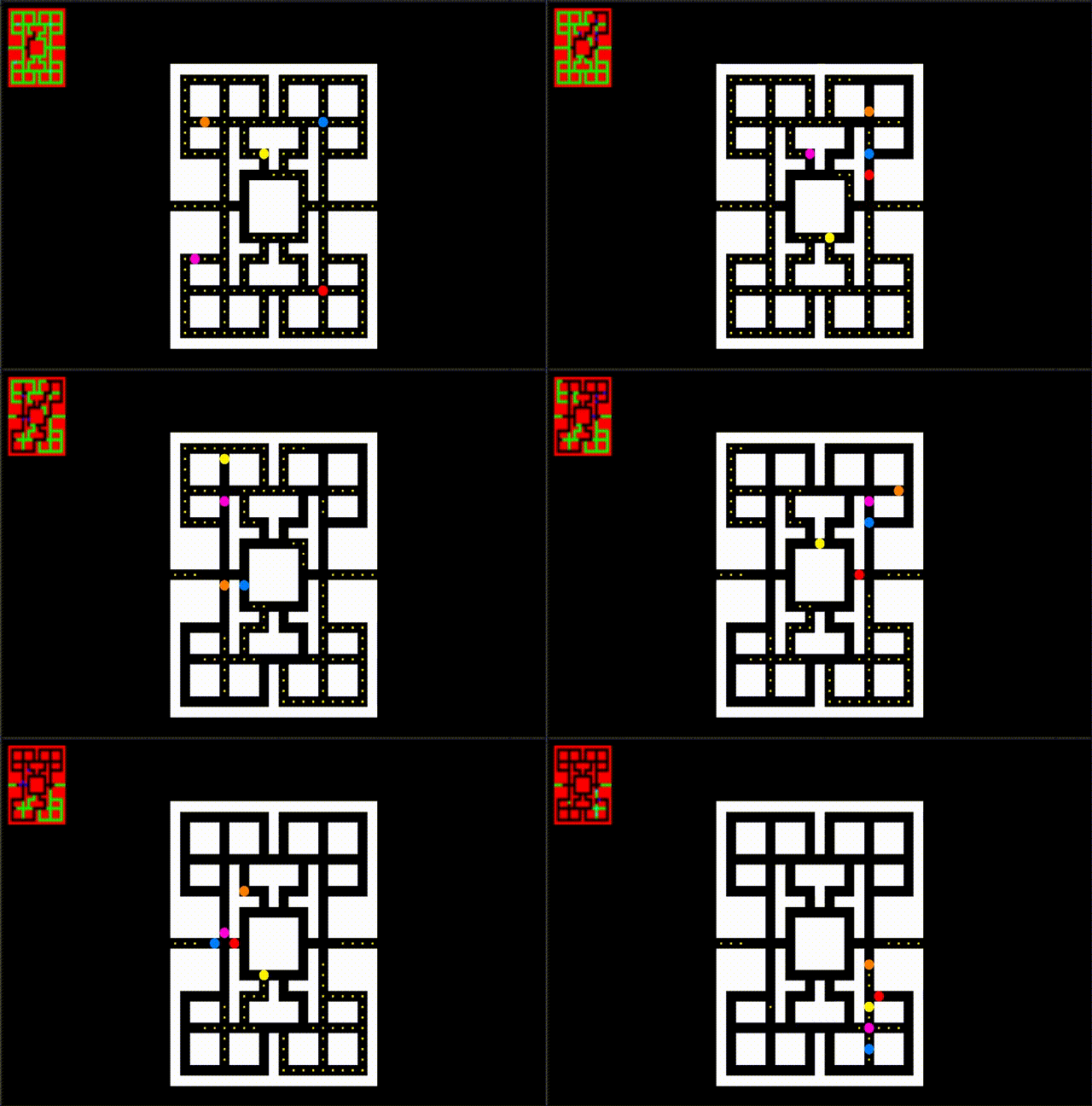
验证 在稍微调整了下参数(网络架构,步数,学习率,隐藏层,隐藏单元)后练了15M个Epoch。以下为训练过程中随手截的一段,极简版本吃豆人这要什么自行车,甚至可视化在训练过程中都是可优化项……
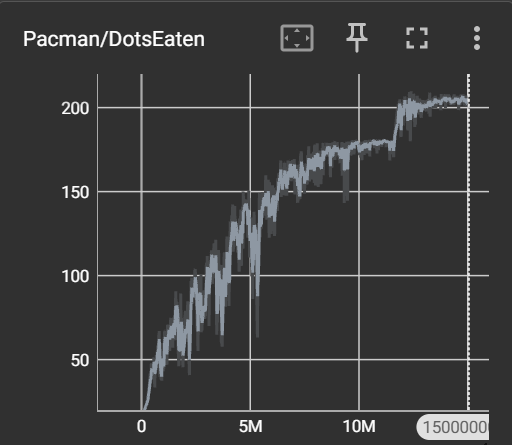
然后大致结果如下,大致历程为开始采用状压表示豆子+全连接架构,收敛至90豆;后采用图像感知+match3架构,收敛至180豆;最后添加区域奖励,收敛至200+豆,终于能完成游戏了。
小结 个人将强化学习的产物视作一个复杂的状态机,能在很多情况下让游戏中的角色更加智能。但调试起来比较依靠直觉,试错以及经验……不愧是炼丹,入教了这(

 wechat
 alipay