ML-Agents is Unity’s official reinforcement learning framework, using gRPC for communication between Python and Unity. It allows developers to write only C# in Unity, configure training parameters via YAML files, and train desired models. During my learning process, I found that most available materials were for outdated, incompatible versions, so I felt it necessary to document the relevant steps.
Preparation
Resources
Referencing the Official Documentation, the ML-Agents package can be installed directly via Unity’s Package Manager. For the Python environment, Conda is recommended, especially considering the somewhat specific version requirement of Python 3.10.1-3.10.12. Next, clone the official GitHub repository, and run:
This installs the necessary libraries. It should be noted that a CUDA version of PyTorch is not strictly required for this; we’re not training large models, and using Burst can even offer better compatibility.
General Usage
The framework for controlling agents in Unity code generally looks like the following. Heuristic() is not strictly required but is commonly used for testing the environment or recording expert data, so it’s quite useful and recommended. For invoking neural network inference, you can call RequestAction() in the traditional Update() method to tick each step, or attach a DecisionRequester script to the agent GameObject to customize the tick frequency (e.g., every N frames). After attaching a script inheriting the agent base class, a BehaviourParameters component is automatically added. You then need to configure the correct input and output dimensions (number of floats) in SpaceSize and ContinuousActions.
1 2 3 4 5 6 7 8 9
using Unity.MLAgents; // Import namespace
publicclassPlayerAgent : Agent// Inherit agent base class { publicoverridevoidOnEpisodeBegin() // Called at episode start (typically resets environment) publicoverridevoidCollectObservations(Unity.MLAgents.Sensors.VectorSensor sensor) // Collect parameters for the neural network publicoverridevoidHeuristic(in Unity.MLAgents.Actuators.ActionBuffers actionsOut) // Convert keyboard/mouse input and fill output parameters publicoverridevoidOnActionReceived(Unity.MLAgents.Actuators.ActionBuffers actionBuffers) // Process parameters and apply rewards/penalties }
For the YAML configuration, you can start by copying the official example. Modifying it requires some basic machine learning knowledge. Notably, vis_encode_type options include simple, nature_cnn, resnet, match3 (specialized for match-3 games), and fully_connected. Among these, simple uses a 20x20 convolutional kernel, nature_cnn uses 36x36, resnet uses 15x15, and match3 uses 5x5. The input dimensions must not be smaller than the kernel size.
Recently, I came across an introduction to the ghost behavior patterns in Pac-Man and was once again amazed by the clever design of classic FC/NES games. I thought it would be interesting to recreate and train this.
Ghost Name
Color
Behavior Pattern
Core Strategy & Target
Blinky
Red
Chaser
Always aims directly at Pac-Man’s current position for straight pursuit.
Pinky
Pink
Ambusher
Targets a position 4 tiles ahead of Pac-Man for interception and ambush.
Inky
Blue
Opportunist
Targets the mirrored point between Blinky and a position 2 tiles ahead of Pac-Man. Often attacks from the flank or rear.
Clyde
Orange
Fickle
Directly chases Pac-Man when distance > 8 tiles. Otherwise, moves toward its fixed corner.
A strictly faithful recreation would be too time-consuming. Considering this, I decided to directly create a 21*27 grid map, discretizing the continuous space. This avoids the need for asset creation and greatly simplifies movement and collision logic.
OnEpisodeBegin()
1 2 3 4 5 6 7 8 9 10 11 12 13 14 15 16 17 18 19
publicoverridevoidOnEpisodeBegin() { manager.ResetMap(); var enemyObjs = new GameObject[] { manager.blinky, manager.pinky, manager.inky, manager.clyde }; // Fisher-Yates shuffle. Typically, multiple prefabs are created in the Scene for training together, which is why position modifications are local. for (int i = 3; i > 0; i--) { int randIndex = Random.Range(0, i + 1); Vector2Int temp = enemyPos[i]; enemyPos[i] = enemyPos[randIndex]; enemyPos[randIndex] = temp; }
for (int i = 0; i < 4; i++) { Enemy enemy = enemyObjs[i].GetComponent<Enemy>(); enemys.Add(enemy); enemy.curPos = enemyPos[i]; enemy.transform.localPosition = new Vector3(0.5f * (-21 / 2 + enemy.curPos.x), 0.5f * (-27 / 2 + enemy.curPos.y), 0f); } }
publicoverridevoidCollectObservations(Unity.MLAgents.Sensors.VectorSensor sensor) { // Pass player and enemy positions sensor.AddObservation(curPos); for(int i = 0; i < 4; i++) sensor.AddObservation(enemys[i].curPos); // Double compression: state compression to save space (200+ input parameters are too large), scaling to 0f-1f to avoid gradient vanishing/explosion (8-bit compression to prevent overly small numerical changes) int groupCount = 28, dotsPerGroup = 8; // 224/8=28 for (intgroup = 0; group < groupCount; group++) { uint bitMask = 0; for (int i = 0; i < dotsPerGroup; i++) { int dotIndex = group * dotsPerGroup + i; if (dots[dotIndex]) bitMask |= (1u << i); }
case2: // empty curPos = tarPos; transform.localPosition = new Vector3(0.5f * (-MAP_WIDTH / 2 + curPos.x), 0.5f * (-MAP_HEIGHT / 2 + curPos.y), 0f); break; } // Ghost speed increases with the number of dots eaten if (++tmp > dotsEaten / 100 + 1) tmp = 0; elsefor (int i = 0; i < enemys.Count; i++) enemys[i].Tick();
int minGhostDist = 114514; for (int i = 0; i < enemys.Count; i++) { int aid = curPos.x + curPos.y * MAP_WIDTH, bid = enemys[i].curPos.x + enemys[i].curPos.y * MAP_WIDTH; if (!dis.TryGetValue(new Vector2Int(aid, bid), outint dist)) dist = 114514; if (dist == 0) EndPacmanEpisode(); elseif (dist < minGhostDist) minGhostDist = dist; } AddReward(-0.01f * Mathf.Max(0, 3 - minGhostDist)); }
EndPacmanEpisode()
1
2
3
4
5
6
7
8
publicvoidEndPacmanEpisode() { // Since reward values do not directly represent the number of dots eaten, add statistics for dots eaten and wall hit rate var statsRecorder = Academy.Instance.StatsRecorder; statsRecorder.Add("Pacman/DotsEaten", dotsEaten); statsRecorder.Add("Pacman/WallHitRate", (float)wallsHit / steps); EndEpisode(); }
PacmanVisualSensor.cs
Here, I passed information about walls, dots, enemies, and the player as an image to the agent network, requiring an additional script.
publicintWrite(ObservationWriter writer) { if (agent.manager == null || agent.enemys == null) { // Safe initialization, set all to 0 for (int c = 0; c < channels; c++) for (int y = 0; y < height; y++) for (int x = 0; x < width; x++) writer[c, y, x] = 0f; return width * height * channels; }
for (int y = 0; y < height; y++) { int mapY = Mathf.Clamp(y * PlayerAgent.MAP_HEIGHT / height, 0, PlayerAgent.MAP_HEIGHT - 1); for (int x = 0; x < width; x++) { int mapX = Mathf.Clamp(x * PlayerAgent.MAP_WIDTH / width, 0, PlayerAgent.MAP_WIDTH - 1); // Channel 0: Walls writer[0, y, x] = agent.manager.mapData[mapX, mapY] == 1 ? 1f : 0f; // Channel 1: Dots writer[1, y, x] = agent.manager.mapData[mapX, mapY] == 0 ? 1f : 0f; // Channels 2-5: Four independent ghost channels (Key modification) writer[2, y, x] = 0f; writer[3, y, x] = 0f; writer[4, y, x] = 0f; writer[5, y, x] = 0f; // Iterate through the ghost list to check if any ghost is at the current (mapX, mapY) for (int i = 0; i < agent.enemys.Count; i++) { var e = agent.enemys[i]; if (e.curPos.x == mapX && e.curPos.y == mapY) writer[2 + i, y, x] = 1f; } // Channel 6: Player itself writer[6, y, x] = (agent.curPos.x == mapX && agent.curPos.y == mapY) ? 1f : 0f; } } return width * height * channels; } } }
Verification
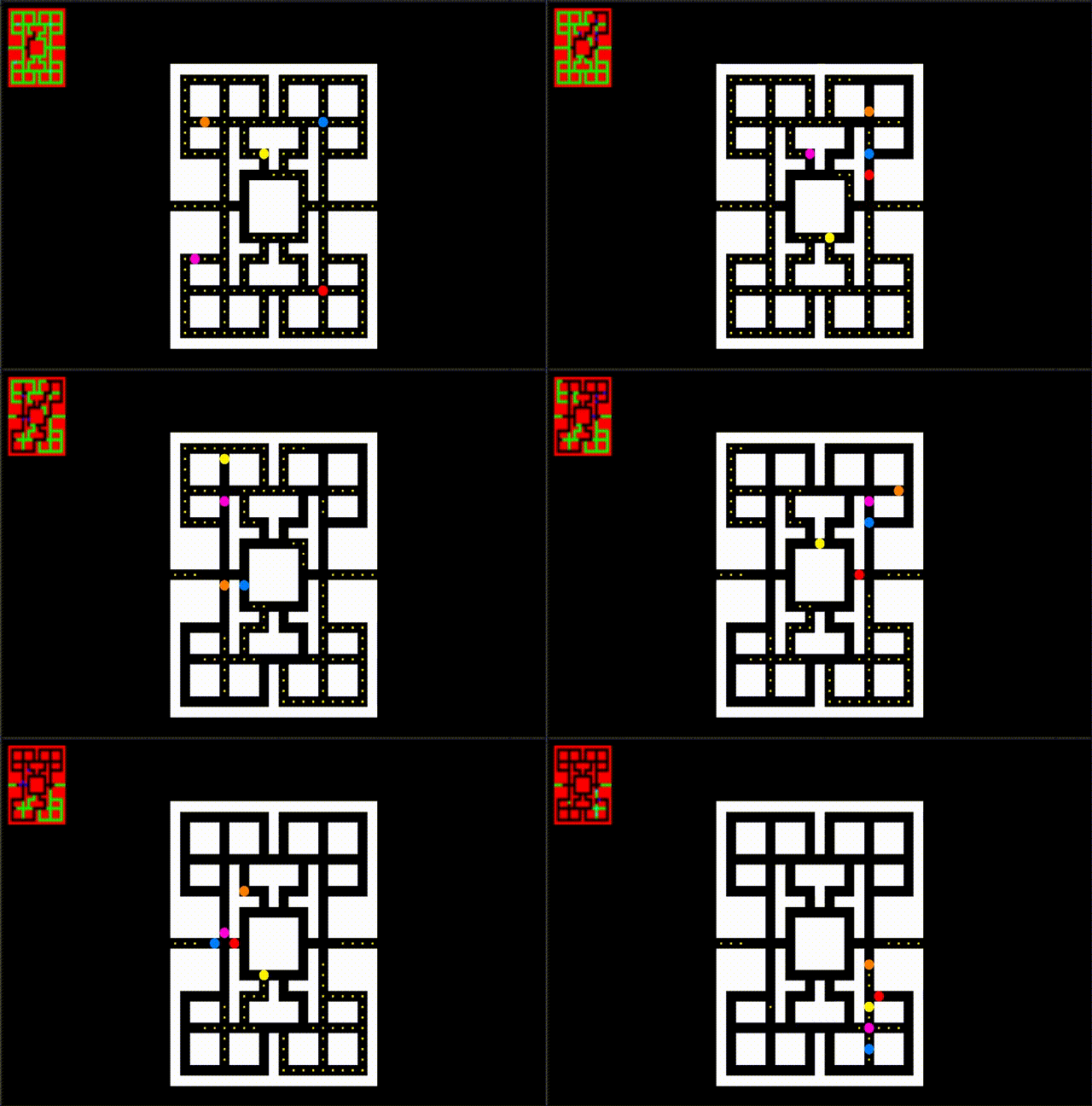
After slightly adjusting parameters (network architecture, steps, learning rate, hidden layers, hidden units), I trained for 15M epochs. The following is a segment captured during training. For this minimalist Pac-Man, it performs reasonably well. Visualization during training is even an optimizable aspect…
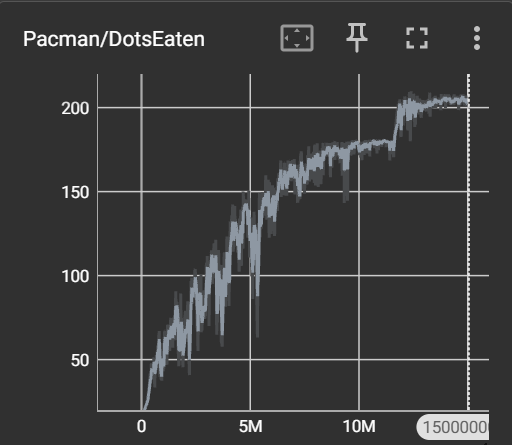
The results are roughly as follows: Initially using state-compressed dot representation + fully connected architecture, convergence reached ~90 dots; later using image perception + match3 architecture, convergence reached ~180 dots; finally, adding area rewards, convergence reached 200+ dots, finally able to complete the game.
Summary
I view the product of reinforcement learning as a complex state machine that can make characters in games more intelligent in many situations. However, debugging relies heavily on intuition, trial and error, and experience… Truly like alchemy, and I’m joining now(

 wechat
 alipay