XNode Introduction and Visual Dialogue Editor
In the previous engine tool summary, I mentioned that XNode can be used to write visualizations. During the winter vacation in the Netherlands, I would like to introduce XNode and its related uses based on the simple visual dialogue editor I wrote before.
About XNode
XNode is a Unity visual editor plugin. Another similar plugin is NodeGraphProcessor. I personally prefer the (self-proclaimed) lightweight and user-friendly XNode because I like its interface. Here is a picture for your comparison.
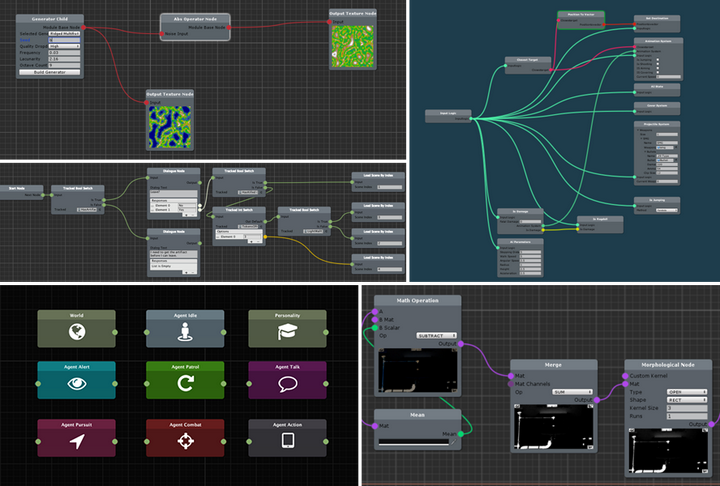
XNode
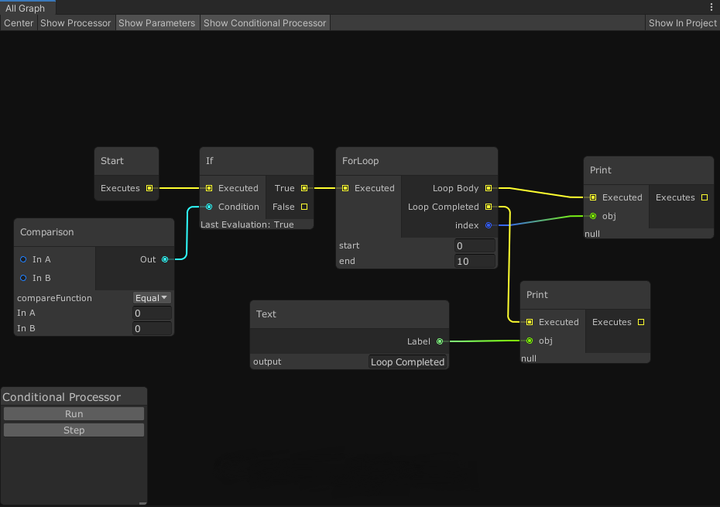
NodeGraphProcessor
Use XNode
XNode is divided into Graph (the entire visual graph), Node (customized node) and Port (port for connecting nodes). To create a custom visual editor, you need a Graph script (to create the corresponding graph), a Node script (to define the content of the node), and a NodeEditor script (optional, to define how the elements in the node are drawn in the graph). You can fully connect to Odin and let it control it, or you can use Unity for serialization and call the GUI for drawing. I personally choose the latter (I don’t have money to buy Odin.jpg). In addition, although the official has provided a corresponding demonstration project, those addition, subtraction, multiplication and division are too simple to be customized, so I will briefly explain it in combination with my code content later (if you need details and basics, you can move to the official document).
Node
Let’s start with the node, which is the most critical and indispensable part of XNode. However, XNode encapsulates this part well. You can use its given properties after inheriting Node. You can add [NodeWidth] before the class to limit the width, and add [Input] and [Output] to the elements in the class to determine whether it is an input or output terminal. The ConnectionType.Multiple in the [OutPut] part means that as an output node, it can pass values to multiple input nodes, and for list output, dynamicPortList needs to be set to true so that XNode can manage the connection information of each node.
1 | [] [NodeWidth(350)] |
Editor
Then there is the editor. Although it is not necessary, you have to modify it if you want to do something fancy. For my dialogue editor, the number of input and output ports of a single dialogue item is uncertain, so you need to inherit NodeEditor to modify the editor. Here is a part of my code, which mainly focuses on the magic modification of the drawElementCallback function of ReorderableList. It is also worth mentioning that the EditorGUILayout of the underlying Unity is invalid here. Just use EditorGUI to align yourself or use Odin to do simplify the work.
1 | [] |
Graph
There is actually nothing to say about the last graph. Just inherit NodeGraph and give it a name in CreateAssetMenu. But for an editor, you have to define how to read the nodes in your graph and how to pass information. This depends on you. I simply separate the acquisition of information and event movement. I think this is more logical.
1 | [] |
The final dialogue node diagram above is a passage from A Glowing Canvas on the Color of Timidity . It is quite touching. Take a step forward or take a step back, which choice will you make?
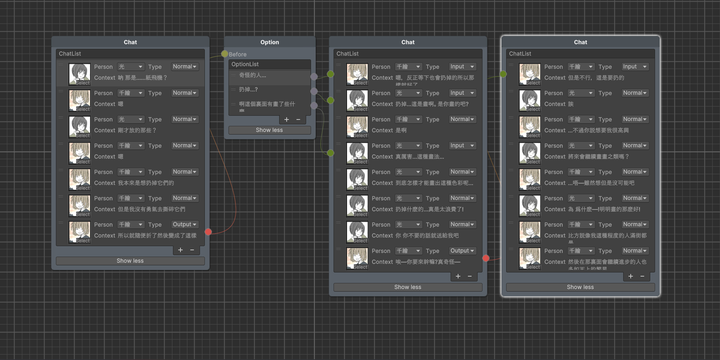
A Glowing Canvas on the Color of Timidity
Written behind
This is the end of the brief introduction of XNode. The editor tool seems simple, but it is very laborious to implement. After all, I also introduced reflection of variables and functions to realize retrieval and event nodes (InstanceID and GUID storage, GenericMenu display) and encapsulated DialogueSystem to read the information in the diagram through Next(). After completion, I also followed XNode and put it on Unity Assets. At the same time, I open sourced the tool and source code to Github, hoping to be of some help to those who come later.
After initially completing the basic functionality of the dialogue system, I released it to the Unity Asset Store and have been continuously maintaining the open-source version on GitHub. Subsequent updates to this tool primarily stem from issues encountered during actual use: when the original implementation can no longer meet new requirements, or the existing structure needs adjustment, the code is re-examined and iterated upon.
1.1 Debugging Functionality
Debugging support has been added to the existing dialogue flow, making the runtime dialogue progression more intuitive. Combining node color changes with prompts indicating the current reading position makes it easier to check the execution status of dialogue branches, reducing the debugging cost of complex dialogue flows.
1.2 Multilingual Support
Multilingual support has been added to the dialogue system, enabling the same dialogue graph to read the corresponding text content based on the current language, further expanding the editor’s applicable scenarios.
1.3 Experience and Structure Optimization
As functionality has gradually increased, the focus of updates has shifted from simply adding node functionality to improving the editing experience and overall structure. A unified toolbar, language settings, and a separate speaker management window have been added, supporting explicit specification of entry nodes, checking graph structure, and highlighting issues. Node collapsing and runtime highlighting logic have also been optimized, simplifying the editor and runtime code structure, so that core functionality no longer depends on the example DialogueSystem.
Trade-offs
Not all ideas will ultimately become official features. For example, we considered importing and exporting dialogue content via JSON or YAML to further integrate with AI-generated dialogue text. However, after completion, we found that there was a strong correlation between dialogue text and events, game objects that check nodes depend on, functions, and specific game logic. Web AI could not handle serialization, while proxy AI could modify editor nodes in the project in one step. Therefore, this direction has been temporarily shelved.
Looking back, the iteration of this project did not revolve around a pre-planned list of features, but rather constantly sought a balance between actual needs and existing implementations. Rather than continuously adding features, I hoped that each update could solve real-world project pain points and ensure that the tool maintains a clear and maintainable structure even after feature expansion.
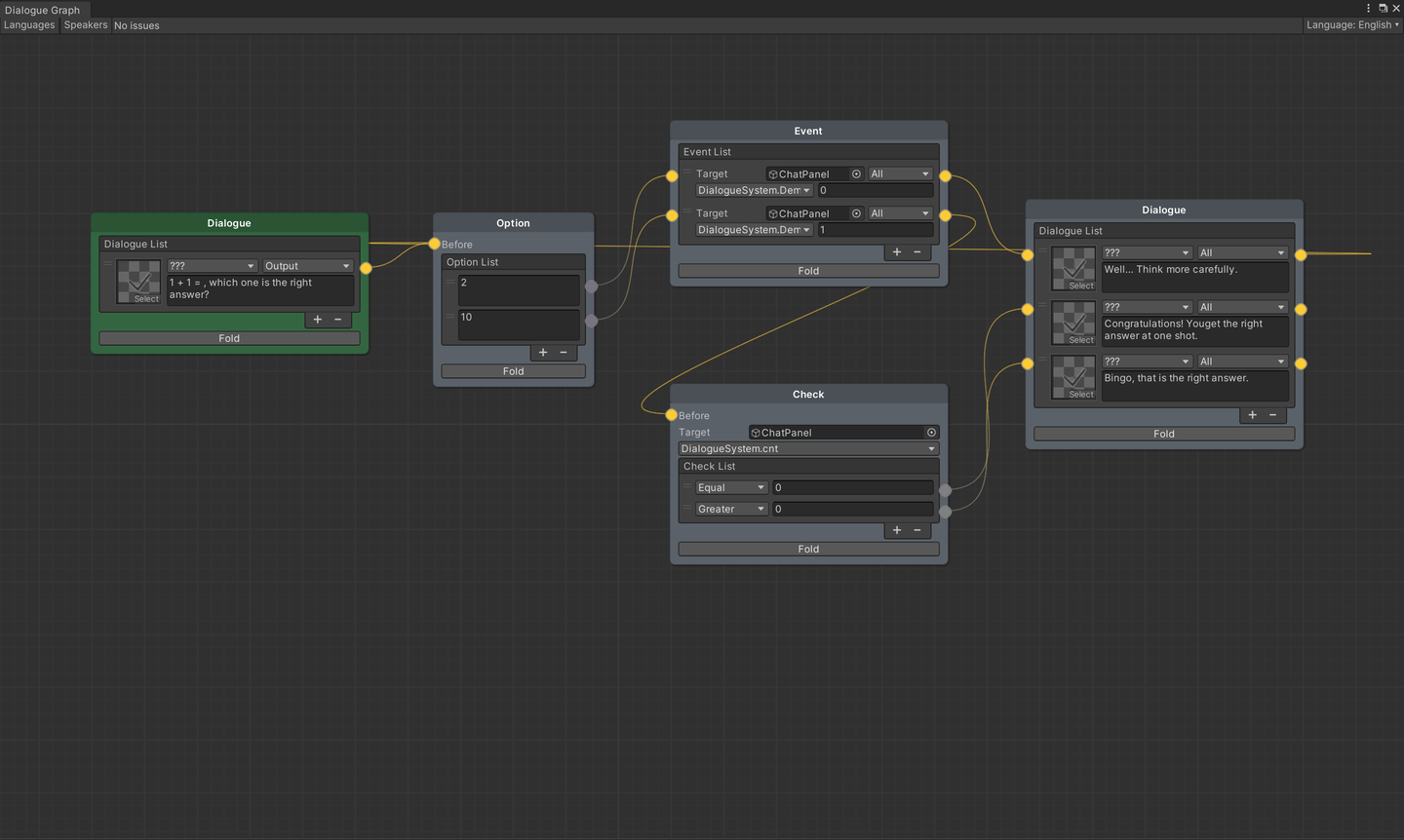
Four Nodes of Dialogue System
 wechat
 alipay